
Social annotation — having students read and comment in the margins of a text together — is one simple way to make assigned reading in our classes visible, shared, and hopefully a little more accountable for students.
At Rollins we now have two supported tools for this work: Olin Study Stax (OSS), a reading-list platform built on Kortext’s Talis Aspire that offers a simple annotation feature within a PDF viewer interface, and Perusall, a standalone annotation tool for educational text, image, video, and audio content.
Why Annotate Together?
Rachel Walton, Associate Professor, Librarian, Head of Digital Strategies & Scholarly Communication, Olin Library, Rollins College
Most of us know the problem by heart: students arrive at class not having done the reading or having skimmed it so lightly that discussion never gets off the ground. The familiar fixes — a reading quiz, a weekly reading journal — mostly check compliance after the fact, and they keep reading a solitary, invisible act that happens in the shadows. Social annotation offers a different approach for both us and our students. It moves the reading into a shared space, where students mark up the same text together and ask questions of the text (and each other!) in the margins before they ever walk into the classroom.
I feel this small shift can do some real (pre-engagement) work in the teaching and learning space. Because the annotating happens in context — right next to the sentence that provoked it — students may be more inclined to slow down and read more closely or even re-read sections of a text. And because they can see their classmates’ thinking on the page, the task feels closer to a group chat than a formal homework assignment.
More than a decade of research suggests that, over time, this kind of annotation practice can help students develop stronger reading comprehension, allow for rich and valuable peer interaction, and foster a real sense of learning community for a course (Cohn & Kalir, 2022). By conversing in the margins of a key text before class, students gain accountability and early peer feedback, and they may also be exposed to differing interpretations of the same material. It also can offer a low-stakes space for students to ask questions, express confusion, and test not-yet-vetted ideas in a more conversational environment (McDaniel, 2021). And because annotations remain visible over time, they can support asynchronous and flipped learning practices and help us identify which concepts students understand and which might require further attention in class (Jiang, 2022).
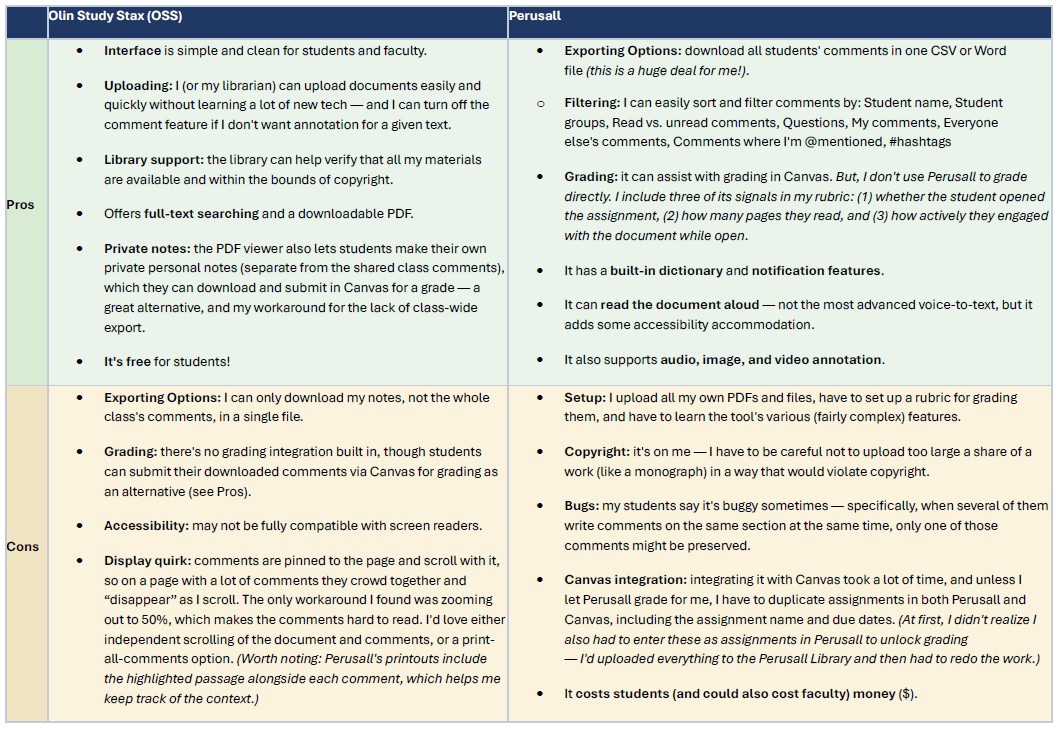
Since arriving at Rollins in fall of 2025, David Ponton, in Sociology, has taught with both annotation tools. His comparison of and insight into these two tools are offered in review and comparison table below for the benefit of all our Rollins colleagues.
Two Tools for the Job: Pros and Cons
David Ponton, Associate Professor, Director of African and African American Studies, Department of Sociology at Rollins College
On their faces, Perusall and Olin Study Stax (OSS) offer the same opportunities: platforms where instructors can organize course materials and where students can practice active reading by annotating documents and engaging with their peers. However, under the surface these tools solve different problems and generate different challenges. For me, the choice about which to use and for which of courses mostly comes down to how much annotating I am actually assigning and how I want to grade it.
When I just want students to leave a few comments on a standard PDF reading, OSS is the path of least resistance. The interface is clean, my students ran into no technical snags, and — this matters more than it sounds — I don’t have to do it alone or worry about copyright. Olin Library is able to help acquire or create digital copies of needed readings and upload them for my students without violating copyright. This means my prep time goes to teaching instead of logistics.
When annotation is doing heavier lifting in a course or when I need students to be able to annotate non-text course materials, Perusall’s more robust features have proven indispensible. The feature I leaned on most: exporting a whole class’s comments at once as a Word document or in an Excel file. These options made it easy to slice up student contributions however I needed — by student, by group, by the questions they raised, by hashtags, etc. I also folded its reading-engagement signals (for instance, its measure of how long and how active a student was while reading) into my own unique grading rubric, without ever grading inside the tool itself (though it does have a grading mechanism built in that some might want to utilize). Its printouts keep each comment next to the passage it’s attached to, so the context travels with the note, and that makes for readily accessible context necessary for understanding and assessing student contributions.
On the downside, Perusall can be buggy. One persistent challenge appeared when several students attempted to annotate the same passage at the same moment. Frustrated students indicated that their comments might not survive. Fortunately, however, none of the bugs my students my students encountered were fatal. On the instructor’s end, wiring Perusall into Canvas took real time. Unless you let Perusall auto-grade your students’ work, you’ll likely have to enter assignments in both systems manually. Finally, Perusall’s pricing model has been shifted – it used to be a completely free tool, but now, except in rare occasions, there are charges mandatory for students can look like a hidden class cost. Perusall allows departments to pay an upfront cost based on the estimated number of students who will enroll in a given course that would allow students to avoid paying any fees, but this remains a quandary for departments with ever-tightening budgets and for instructors committed to offering no-fee, no-cost course materials.
OSS has the benefit of library support with textual materials and it’s free, but it does have limitations that can be frustrating. Comments are pinned to the page and scroll with it, so on a heavily annotated page they pile up and can slide out of view. The only workaround I found for this issue was zooming out to 50%, which shrinks text and makes it difficult to read. When it comes to the time-consuming task of grading, Perusall’s independent scrolling experience and its print-all-comments option is the enviable platform. So that is a tradeoff to consider when evaluating which tool to use. For my courses that require more sophisticated annotation, such as identifying historical evidence, paraphrasing arguments, linking to relevant archival materials, and uploading images of handwritten notes, such as graphic organizers and t-charts, Perusall is the only feasible option out of the two. However, for less demanding annotation assignments where students are asked to do fewer and less specific tasks, OSS accomplishes the task and is simpler for students to learn how to use.
Where To Learn More
These two tools are each backed by dedicated Rollins support teams. So, reach out to the relevant folks if you’re considering them for your class.
- Olin Study Stax is a new course materials hub that integrates seamlessly with Canvas and is directly supported by the library to ensure the accessibility and affordability of all course materials. Reach out to Librarian Rachel Walton (rwalton@rollins.edu) with questions about how Olin Study Stax can support your students with annotation capabilities if you’re wondering how it can help you with your own course preparation process.
- Perusall is a stand alone social learning platform for annotating text, images, video, and audio content. Reach out to the Rollins Instructional Design Team at helpdesk@rollins.edu with questions about learning, using, and integrating Perusall into your Canvas course.
References:
Cohn, Jenae and Kalir, Remi “Why We Need a Socially Responsible Approach to Social Reading.” The Hechinger Report, April 11, 2022. https://hechingerreport.org/opinion-why-we-need-a-socially-responsible-approach-to-social-reading/.
Jiang, Hong. “Enhancing Student Engagement with Course Materials through Digital Social Reading.” Faculty Focus, August 29, 2022. https://www.facultyfocus.com/articles/effective-teaching-strategies/enhancing-student-engagement-with-course-materials-through-digital-social-reading/.
McDaniel, Sarah. “Social Annotation and the Pedagogy of Hypothesis.” Academic Technology Solutions, University of Chicago, March 3, 2021. https://academictech.uchicago.edu/2021/03/03/social-annotation-and-the-pedagogy-of-hypothesis/.